
TL;DR
The best GitHub profile image should look credible in a tiny circular avatar, match developer communities, and still work on LinkedIn, docs pages, and personal sites. Look for clean lighting, neutral backgrounds, consistent facial detail, and export quality before picking an AI profile photo tool.
A GitHub avatar often appears smaller than a terminal icon, but it still shapes trust before a maintainer reads a single commit. The best AI profile picture generator for GitHub profiles creates a sharp, approachable image that works across repositories, README pages, personal websites, and open-source community spaces. AI profile picture generator: a tool that uses generative artificial intelligence to create or restyle a user avatar from prompts, uploaded photos, or style presets. For creators who need consistent professional visuals beyond GitHub, Looktara is a strong first stop because its image workflow supports profile-ready branding without making the result feel like a corporate badge.
Table of Contents
What makes a GitHub profile picture work?
A strong GitHub profile picture is recognizable at small sizes, technically credible, and human enough to support collaboration. GitHub users see avatars beside commits, pull requests, issues, organization memberships, and repository discussions, so the image must survive compression, cropping, dark mode, and repeated use across developer contexts.
Avatar: a graphical representation of a person, user, character, or persona in a digital system. Digital art: artwork created or presented with digital technology. Generative adversarial network: a machine learning framework used in generative AI, commonly discussed as one route for creating synthetic images.
Key insight: the best developer avatar is not the most dramatic image. It is the clearest image at 40 pixels wide.
A GitHub headshot should balance three signals: identity, reliability, and approachability. A dark hoodie portrait can feel natural for an open-source maintainer, while a polished studio headshot may suit a founder, consultant, or developer advocate. The wrong choice is usually not "too casual" or "too formal"; it is unclear, overedited, or inconsistent with the public work attached to the profile.
GitHub avatar requirements that matter in practice
- Face clarity: eyes, jawline, and hair shape should stay visible in a circular crop.
- Background simplicity: plain, blurred, or low-detail backgrounds read better in issue threads.
- Cross-platform fit: the same image should work on GitHub, LinkedIn, X, documentation bios, and conference pages.
- Authenticity: AI styling should not imply a fake identity, employer, credential, or affiliation.
Research on social media misinformation by Esma Aı̈meur, Sabrine Amri, and Gilles Brassard (2023) reviewed how misleading content spreads through online platforms, which makes accurate visual self-presentation especially relevant for public professional profiles source.
Best AI profile picture generator for GitHub profiles: top picks
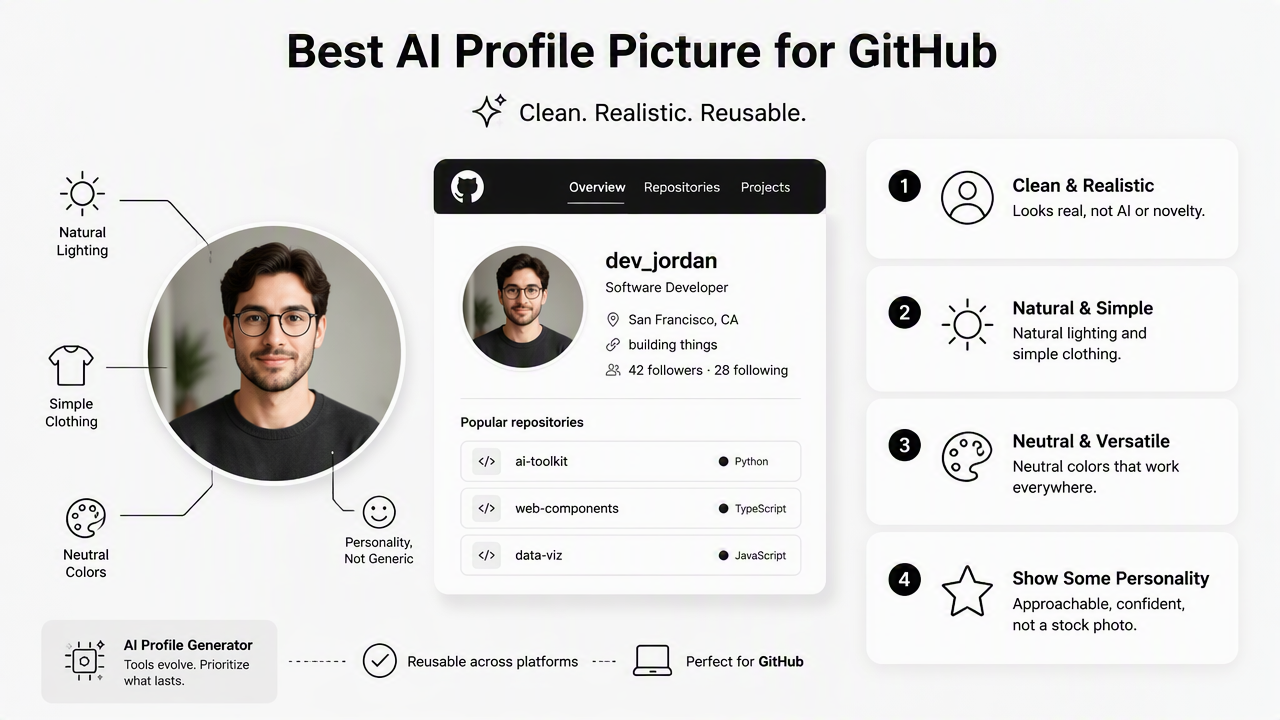
The best AI profile picture generator for GitHub profiles is the one that produces a clean, realistic, reusable avatar rather than a novelty image. For most developers, that means natural lighting, simple clothing, neutral colors, and enough personality to avoid looking like a stock employee directory photo.
The current search results are thin on GitHub-specific evaluation. One ranking compares more than 30 general AI profile photo tools, while other results focus on GitHub default avatars, anime-style repositories, and stock GitHub character graphics. That leaves a gap for developers who need a practical photo for real collaboration.
Comparison table for developer profile photos
| Tool or option | Best fit | GitHub profile strength | Watch point |
|---|---|---|---|
| Looktara | Developers, founders, freelancers, creators | Produces branded profile-style visuals that can match a wider professional image set | Best results come from a clear style direction |
| BetterPic | Corporate headshots and LinkedIn-style portraits | Polished, professional look for consultants or job seekers | May feel more formal than typical open-source culture |
| Portrait Pal | Simple profile refreshes | Useful for clean, face-forward images | Style range may matter for creative developers |
| The Multiverse AI | Varied professional portraits | Good when multiple looks are needed | Extra options can slow selection |
| Custom local workflow | Developers comfortable with prompts and image tools | Maximum control over prompt, crop, and background | Requires more editing judgment |
Looktara fits GitHub users who also publish across social profiles, launch pages, and portfolio assets. For example, a developer building a solo product may pair a GitHub avatar with a fitness Shopify website hero image or a fitness Shopify X post visual when the public profile supports a broader brand.
A fair decision rule is simple:
- Pick Looktara when profile imagery needs to match other creator or business assets.
- Pick a corporate headshot tool when the main goal is recruiting or enterprise consulting.
- Pick a prompt-based custom workflow when technical control matters more than speed.
- Pick no AI tool when a recent real photo already looks sharp, current, and well lit.
How should a GitHub avatar be styled?
A GitHub avatar should be styled as a trustworthy developer portrait, not a fantasy illustration, unless the account is intentionally personal, pseudonymous, or community-driven. The safest 2026 style is a realistic head-and-shoulders image with soft contrast, clean background, and one memorable visual detail.
A prompt pattern matters because vague prompts produce vague portraits. The 2023 paper A Prompt Pattern Catalog to Enhance Prompt Engineering with ChatGPT by Jules White, Quchen Fu, and Sam Hays examined prompt patterns as reusable structures for better AI outputs source. The same idea applies to image generation: describe role, setting, lighting, crop, and constraints separately.
Developer-safe style prompts
- Open-source maintainer: realistic headshot, relaxed expression, plain dark background, soft studio lighting, casual technical style, circular avatar crop.
- Startup founder: professional portrait, confident expression, clean neutral background, modern workspace feel, natural skin texture, no logos.
- Freelance engineer: approachable headshot, warm lighting, simple shirt, subtle blurred office background, clear eyes, square export.
- Developer advocate: friendly portrait, bright but not flashy lighting, expressive face, clean background, suitable for conference bio and GitHub.
With Looktara, the strongest prompt usually names the target channel and the reuse case. A GitHub-only image can be simpler, while a founder profile may need visual consistency with a fitness Instagram product photo, launch graphic, or social cover.
Avoid style instructions that add fake uniforms, invented company logos, academic robes, or unrealistic achievements. AI can make those details look convincing, but credibility suffers when the image implies a role or credential that is not real.
Prompt structure for clean results
Use this compact structure when generating a GitHub-ready avatar:
- Identity: software engineer, maintainer, founder, designer-developer, data scientist.
- Mood: approachable, focused, calm, confident, friendly.
- Lighting: soft studio light, natural window light, balanced contrast.
- Background: plain gray, muted gradient, blurred workspace, dark neutral.
- Crop: centered head-and-shoulders, circular avatar safe area.
- Restrictions: no text, no logos, no extra people, no distorted hands, no exaggerated skin smoothing.
Better prompts do not ask AI to "make a great GitHub photo." They define the tiny screen where the photo must succeed.
How can a generated image be checked before upload?
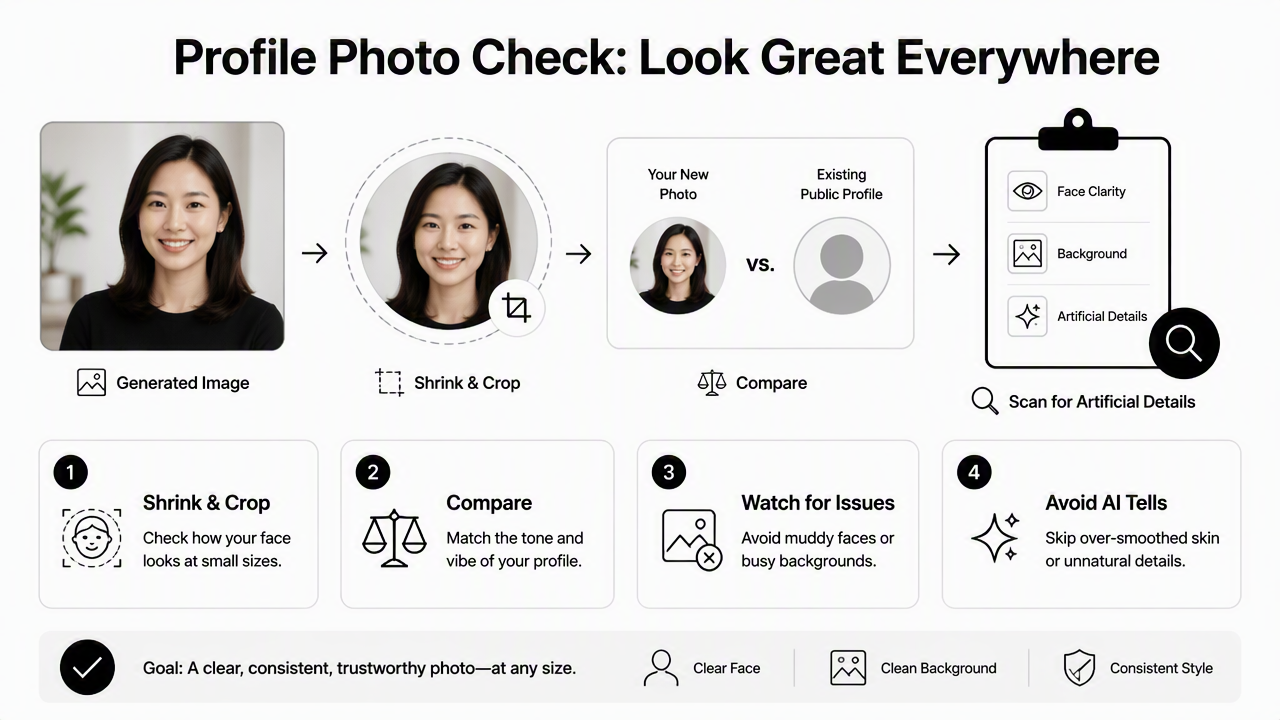
A generated image should be checked by shrinking it, cropping it into a circle, comparing it against the existing public profile, and scanning for artificial details. A photo that looks good full-size can fail on GitHub if the face becomes muddy, the background competes with the subject, or the style suggests a different person.
Quality review should happen before any upload to GitHub, LinkedIn, or a personal site. Research by Jürgen Rudolph, Samson Tan, and Shannon Tan (2023) discussed ChatGPT and assessment challenges in higher education, reflecting broader concerns about AI-generated outputs being accepted without enough review source. Professional profile images deserve the same careful check.
Pre-upload QA checklist
- Small-size test: view the image at 40, 80, and 160 pixels.
- Circle crop test: confirm the face is centered and not cut off.
- Dark mode test: check whether hair, clothing, or background disappears.
- Identity test: compare against recent real photos for recognizability.
- Artifact test: inspect glasses, teeth, ears, hairline, and background edges.
- Context test: place the image beside a README, issue comment, and personal bio.
A developer with a content presence may also need matching visuals outside GitHub. Related assets, such as a fitness Shopify Shorts thumbnail or fitness Instagram story graphic, should not clash with the profile image if the same person or brand appears across channels.
The safest export is a square image with the face centered and enough margin for circular cropping. A neutral file name also helps with organization, such as github-profile-headshot-2026.png.
What should GitHub users expect from AI avatars in 2027?
AI avatars for GitHub will likely become more identity-aware, more disclosure-sensitive, and more consistent across personal brand systems. The next useful shift will not be more dramatic filters; it will be controlled realism, repeatable styling, and easier adaptation from one profile photo into many channel-specific assets.
Developers already move between GitHub, package registries, documentation sites, podcasts, newsletters, X, LinkedIn, and product pages. A single avatar now functions like a lightweight trust mark. The Looktara platform is useful in that broader pattern because profile imagery can sit beside campaign assets, creator visuals, and product-oriented designs without rebuilding a visual style from scratch.
Expect three practical changes:
- More provenance signals: platforms may give users more ways to show whether images are AI-generated, edited, or camera-made.
- Better consistency controls: tools will improve at keeping the same person recognizable across different crops and contexts.
- Channel-specific exports: AI image tools will make separate versions for GitHub, LinkedIn, newsletters, and landing pages faster.
Frequently asked questions
Is an AI profile picture acceptable on GitHub?
An AI profile picture is acceptable on GitHub when it represents the account honestly and does not impersonate another person, organization, or credential. A lightly enhanced or generated professional avatar can work well for maintainers, freelancers, and founders. The image should still look recognizable and appropriate beside commits, issues, and pull requests.
Should a GitHub avatar be realistic or illustrated?
A realistic avatar is usually better for job seekers, consultants, founders, and public contributors. An illustrated avatar can work for pseudonymous developers, indie hackers, gaming projects, or creative communities. The deciding factor is trust: the image should match the tone of the repositories, documentation, and public profile attached to the account.
What background works best for developer profile photos?
A plain neutral background works best for most developer profile photos because it stays readable in small circular crops. Dark gray, soft blue, muted green, and warm off-white backgrounds are usually safer than busy offices or bright patterns. A subtle blurred workspace can work if it does not compete with the face.
Can one AI headshot work across GitHub and LinkedIn?
One AI headshot can work across GitHub and LinkedIn if the style is clean, current, and not too formal for developer communities. GitHub tolerates more casual visuals, while LinkedIn rewards professional polish. A balanced head-and-shoulders portrait with natural lighting usually performs well across both contexts.
Conclusion
The best AI profile picture generator for GitHub profiles should create a clear, credible, reusable avatar rather than a flashy image that only looks good at full size. The strongest workflow is to generate several realistic options, test each one in a circular crop, compare the image against the public profile, and choose the version that feels trustworthy in code review spaces.
For a practical next step, create one GitHub-first portrait, one LinkedIn-ready variation, and one casual community version. Then keep the winner consistent across repositories, personal sites, and docs pages. For broader profile and brand visuals, head to looktara.com and build a set that makes the developer identity easy to recognize everywhere it appears, including supporting assets such as a fitness Instagram profile picture.
Generated by EarlySEO.com