
TL;DR
The safest AI headshot outfits for women use solid colors, clean necklines, light structure, and minimal accessories. Match the outfit to the goal: blazers for executive polish, soft knits for approachability, refined color for creative roles, and natural styling for dating-profile polish.
A strong AI headshot can look polished or oddly artificial based on one simple input: clothing. The best AI headshot outfits for women give the model clear shape, color, and professional context without busy patterns or distracting shine. Looktara helps turn everyday source photos into brand-ready images, but outfit choices still guide the final result. For job seekers, founders, freelancers, creators, and dating-app users, the winning formula is simple: clean lines, flattering contrast, and clothes that match the intended first impression.
Table of Contents
What are the best AI headshot outfits for women?
The best AI headshot outfits for women are solid-color tops, tailored blazers, fine-knit sweaters, structured blouses, and simple dresses that create a clean silhouette. AI systems usually render clothing more realistically when the source image has clear edges, balanced contrast, and minimal pattern noise.
AI headshot outfit: clothing selected for an AI-generated portrait so the final image looks realistic, professional, and aligned with a specific personal brand goal.
AI headshot tools can generate different outfits, angles, and backdrops, a capability also described by HeadshotPro's AI headshot generator. Still, the source photos matter. A clear neckline, visible shoulders, and non-distracting fabric help the model produce a believable final image.
Key takeaway: clean clothing gives AI fewer details to misread, so the final headshot looks more like a studio portrait and less like a costume change.
Core outfit rules that work across most goals
- Use solid colors: navy, charcoal, ivory, forest green, burgundy, soft blue, and warm taupe read well in most generated headshots.
- Pick light structure: blazers, crisp blouses, wrap tops, and smooth knits give the shoulders definition.
- Keep jewelry quiet: small hoops, studs, fine chains, and one signature piece work better than layered statement accessories.
- Avoid busy pattern clashes: tight stripes, tiny florals, logos, and heavy texture can blur or warp in generated results.
- Match the platform: a resume-ready AI headshot generator benefits from more formal styling than a casual profile photo.
Which outfit works best for each personal brand goal?
The best outfit depends on whether the headshot needs to signal authority, warmth, creativity, speed, expertise, or approachability. Women get more realistic AI headshot results when clothing, background, and accessories all point to the same goal instead of mixing several style signals.
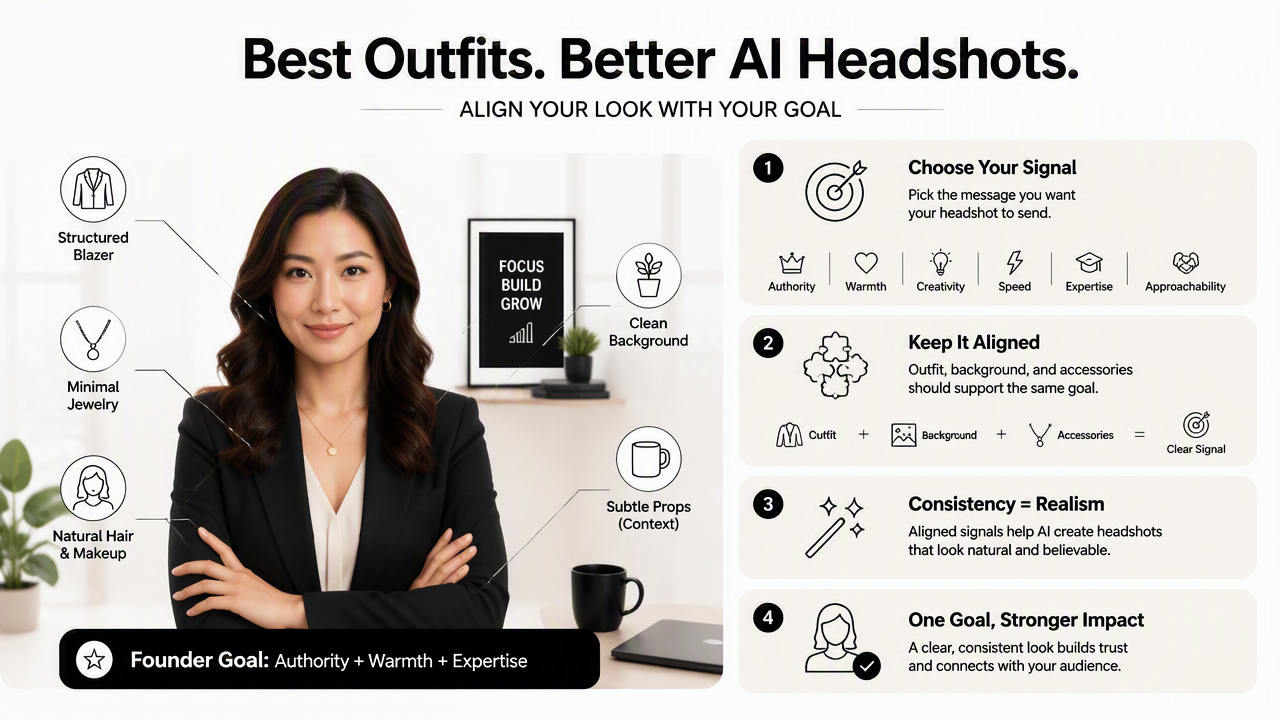
A founder image, for example, can feel confident with a black blazer and soft gray background. A dating-profile image usually works better with a relaxed blouse, natural makeup, and a warmer setting. A consultant often needs the middle ground: polished, calm, and not overly corporate.
Outfit pairings by goal, color, neckline, accessory, and background
| Goal | Best outfit | Color direction | Neckline | Accessory | Background pairing |
|---|---|---|---|---|---|
| Executive | Tailored blazer over silk or matte blouse | Navy, charcoal, black, ivory | V-neck, crew, or soft collar | Studs or slim watch | Gray, office, muted city |
| Approachable leader | Fine-knit sweater or soft blouse | Cream, sage, powder blue, warm beige | Boat neck or scoop | Small hoops | Light office or warm neutral |
| Creative professional | Structured top with one color accent | Teal, plum, rust, cobalt | Square neck or modern collar | One artistic piece | Studio wall or soft color backdrop |
| Startup founder | Blazer with fitted tee or sleek knit | Black, white, olive, denim blue | Crew or open collar | Minimal chain | Modern workspace |
| Consultant | Blouse plus blazer or sheath dress | Navy, stone, burgundy, gray | V-neck or modest wrap | Pearl studs or simple pendant | Boardroom or neutral office |
| Dating-profile polish | Relaxed blouse, sweater, or wrap dress | Jewel tones, blush, cream, soft green | Scoop, wrap, or off-shoulder if tasteful | Delicate earrings | Outdoor blur or warm indoor light |
For social-first professionals, outfit choices should also connect with feed visuals. A creator who uses headshots in launch posts can pair a polished portrait with a branded LinkedIn post visual generator so the headshot and content style feel consistent.
How should color, neckline, and texture be chosen?
Color, neckline, and texture should be chosen to frame the face clearly, separate the body from the background, and reduce visual confusion. Solid mid-tone colors, open but professional necklines, and smooth fabrics usually create the most realistic AI-generated portraits for women.
The outfit should support the face rather than compete with it. Pale clothing against a white background can flatten the image. Dark hair, black clothing, and a black background can merge together. Strong contrast works best when it still looks natural.
A simple selection process before generating images
- Start with the use case: LinkedIn, company bio, speaker page, website hero, creator profile, or dating app.
- Choose one dominant color: navy for trust, cream for warmth, burgundy for depth, cobalt for creative energy, or charcoal for authority.
- Check the neckline: visible collarbones or a clean collar help the portrait feel finished.
- Limit texture: satin, sequins, heavy ribbing, lace, and fuzzy knits can confuse edge detail.
- Pair with the background: formal outfits fit office backdrops, while approachable outfits fit lighter interiors or softly blurred outdoor scenes.
- Keep the face dominant: clothing should frame the portrait, not become the subject.
A business owner planning to use a headshot above a homepage section can coordinate outfit and layout with a website hero image generator. That creates a more consistent brand image than treating the portrait as a one-off asset.
Color combinations that usually render cleanly
- Navy blazer + ivory blouse + gray background: formal, safe, and recruiter-friendly.
- Cream sweater + warm beige background: approachable for coaches, therapists, and consultants.
- Emerald blouse + dark neutral backdrop: confident without looking harsh.
- Black blazer + white tee + modern office: strong for founders and startup operators.
- Burgundy wrap top + soft studio background: polished for speakers, authors, and client-facing roles.
The Looktara platform works best when source images already show clear clothing boundaries, natural posture, and balanced lighting. For profile-focused use cases, a matching Instagram profile picture generator can help keep a professional portrait recognizable across channels.
What should be avoided in AI headshot outfits?
The main outfit mistakes to avoid are busy patterns, reflective fabrics, oversized accessories, extreme necklines, and clothing that blends into the background. These elements can cause AI-generated headshots to look less realistic because the model has to guess too much about shape and detail.
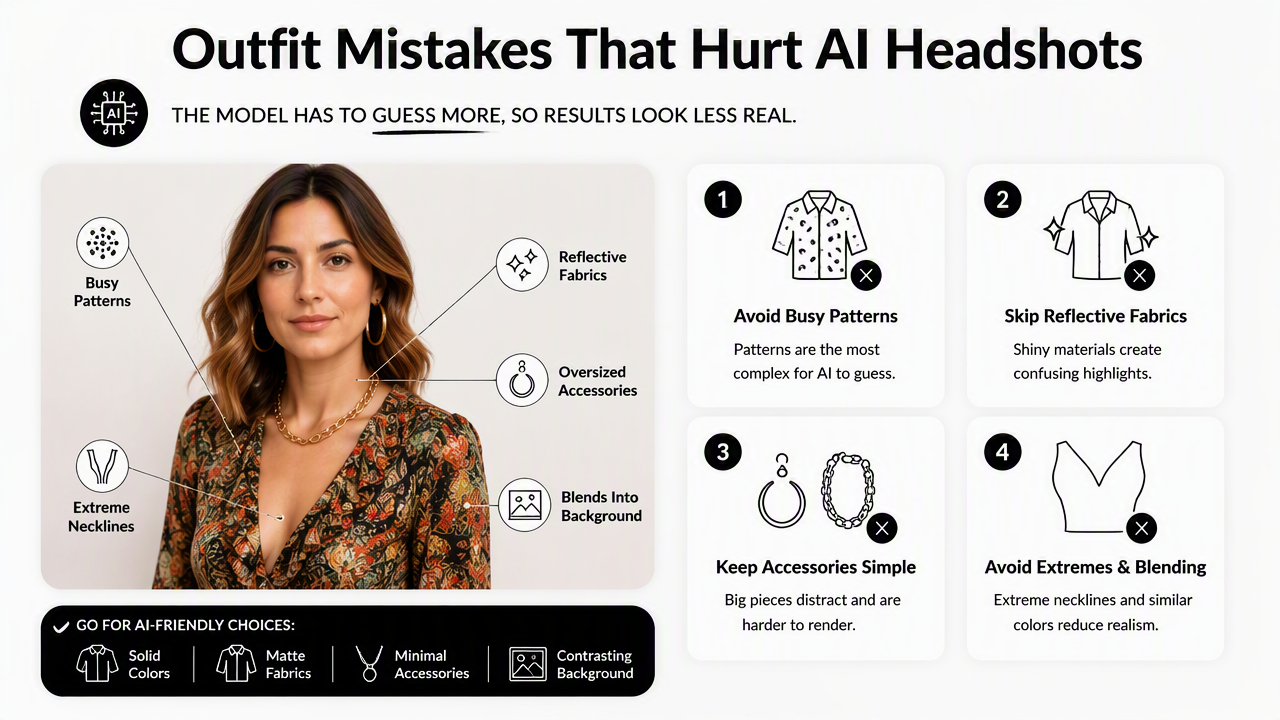
Patterns are the most common issue. Pinstripes, small checks, lace overlays, dense florals, and branded graphics may bend, blur, or repeat unnaturally. Shiny satin and sequins can also create strange highlights around the shoulders and neckline.
Outfit details that often reduce realism
- Tiny repeating prints: may warp or look uneven in the final image.
- Large logos: can become unreadable or distorted.
- Chunky necklaces: may merge with collars or skin tones.
- Sleeveless tops in formal settings: can look less executive unless the brand goal is creative or lifestyle-focused.
- Wrinkled fabric: often becomes more noticeable after generation.
- All-black styling on a dark background: can erase shoulder definition.
Some editing apps focus on retouching existing portraits. For example, Wikipedia describes Facetune as a Lightricks photo and video editing app used for portrait and selfie editing on iOS and Android. AI headshot generation is different because it can create new professional-looking variations, so the clothing input needs to be cleaner from the start.
For promotional materials beyond a headshot, clothing should still match the campaign style. A fitness coach, for example, may pair a clean portrait with a branded Instagram flyer generator rather than mixing casual selfies with formal graphics.
What will change for AI headshot styling in 2027?
AI headshot styling in 2027 will likely move toward more personalized outfits, platform-specific portraits, and stronger realism checks. Clothing will still matter because even better models need consistent visual signals to create believable professional images.
Expect fewer generic black-blazer portraits and more role-specific looks. Recruiters, clients, followers, and dating-app matches all read clothing cues differently. A remote product manager may need a sharper LinkedIn image, while a creator may need a warmer portrait that still feels polished.
Style direction for 2027: the strongest headshots will look less like stock photography and more like credible personal-brand images tailored to a specific channel.
Looktara fits that shift by helping professionals create images for multiple uses, from resumes to profile photos to branded content. For creators building audio or video-led brands, a polished portrait can also support a podcast cover image generator. More style examples can be reviewed at looktara.com.
FAQ: Women's AI headshot outfit choices
What color is safest for a women's AI headshot?
Navy is often the safest color because it feels professional, flatters many skin tones, and separates well from light gray or office-style backgrounds. Charcoal, ivory, burgundy, forest green, and soft blue are also strong options when the clothing is solid and the background creates enough contrast.
Are dresses good for AI headshots?
Dresses work well when the neckline is clean and the fabric is smooth. Sheath dresses, wrap dresses, and simple knit dresses usually render better than ruffled, sequined, or heavily patterned styles. For corporate use, a dress with sleeves or a blazer often creates a more polished frame.
Should jewelry be removed for AI headshots?
Jewelry does not need to be removed, but it should stay minimal. Stud earrings, small hoops, thin chains, and subtle pendants usually add polish without distracting from the face. Large statement earrings or layered necklaces can distort during generation and may pull attention away from the portrait.
Can casual outfits work for dating-profile headshots?
Casual outfits can work well for dating-profile polish when they still look intentional. Soft sweaters, relaxed blouses, fitted tees under jackets, and wrap tops feel natural without looking careless. Warm colors, gentle backgrounds, and simple accessories usually create a more approachable result than formal business attire.
Conclusion
The best AI headshot outfits for women combine solid color, clean structure, simple accessories, and a background that matches the goal. Executive portraits need authority, creative portraits need controlled personality, startup portraits need clarity, and dating-profile portraits need warmth. Before generating new images, select one intended use, choose one outfit direction from the table, and gather source photos with clear lighting and visible shoulders. For a polished next step, visit looktara.com and create headshots that match the profile, platform, and personal brand behind the image.
Generated by EarlySEO.com