
TL;DR
Strong AI portrait prompts name the posture, shoulder angle, head tilt, eye contact, expression, camera height, and setting in one clear instruction. The best results avoid stiff power poses and instead guide the model toward relaxed confidence, authentic facial detail, and platform-appropriate framing.
Confident posture can decide whether an AI-generated portrait reads as executive, approachable, creative, or awkward. AI photo generator prompts for confident posture work best when they describe body mechanics, not just mood words like "professional" or "powerful." Prompt engineering: the practice of structuring natural-language instructions so a generative AI system produces a specified output, as summarized by Wikipedia's prompt engineering entry. For headshot workflows, Looktara is most useful when a prompt includes posture, lighting, clothing, lens style, and the intended platform in one clean brief.
Table of Contents
What are AI photo generator prompts for confident posture?
AI photo generator prompts for confident posture are structured instructions that tell an image model how the subject should stand, sit, face the camera, hold the shoulders, and express calm self-assurance.
A useful prompt combines physical direction with scene context. Instead of asking for "a confident professional," the prompt should specify "upright posture, relaxed shoulders, slight forward lean, direct eye contact, soft smile, natural hands, eye-level camera."
Key insight: posture prompts should describe visible anatomy and camera behavior, not abstract confidence alone.
Research on generative AI adoption, including the 2023 paper by Rudolph, Tan, and Tan on chatbots in higher education, shows how quickly prompt quality became central to AI output quality source. For portraits, that same principle applies: vague language creates generic images, while precise physical cues create believable posture.
Prompt anatomy for confident portraits
A strong posture prompt has five parts: subject, pose, expression, camera, and realism constraints. Each part reduces guesswork for the model.
- Subject: age range, role, style, and setting.
- Pose: upright spine, relaxed shoulders, open chest, stable stance.
- Expression: calm smile, attentive eyes, relaxed jaw.
- Camera: eye-level angle, portrait lens, chest-up crop.
- Realism: natural skin texture, accurate hands, no exaggerated body proportions.
For career images, the prompt can also mention a neutral office, studio backdrop, or soft window light. For creators, it can name a warmer background, a standing pose, or a light gesture that fits content style.
Which posture details signal confidence in AI portraits?
Confident AI portraits usually show an upright spine, open shoulders, balanced head position, steady eye contact, and a relaxed facial expression.
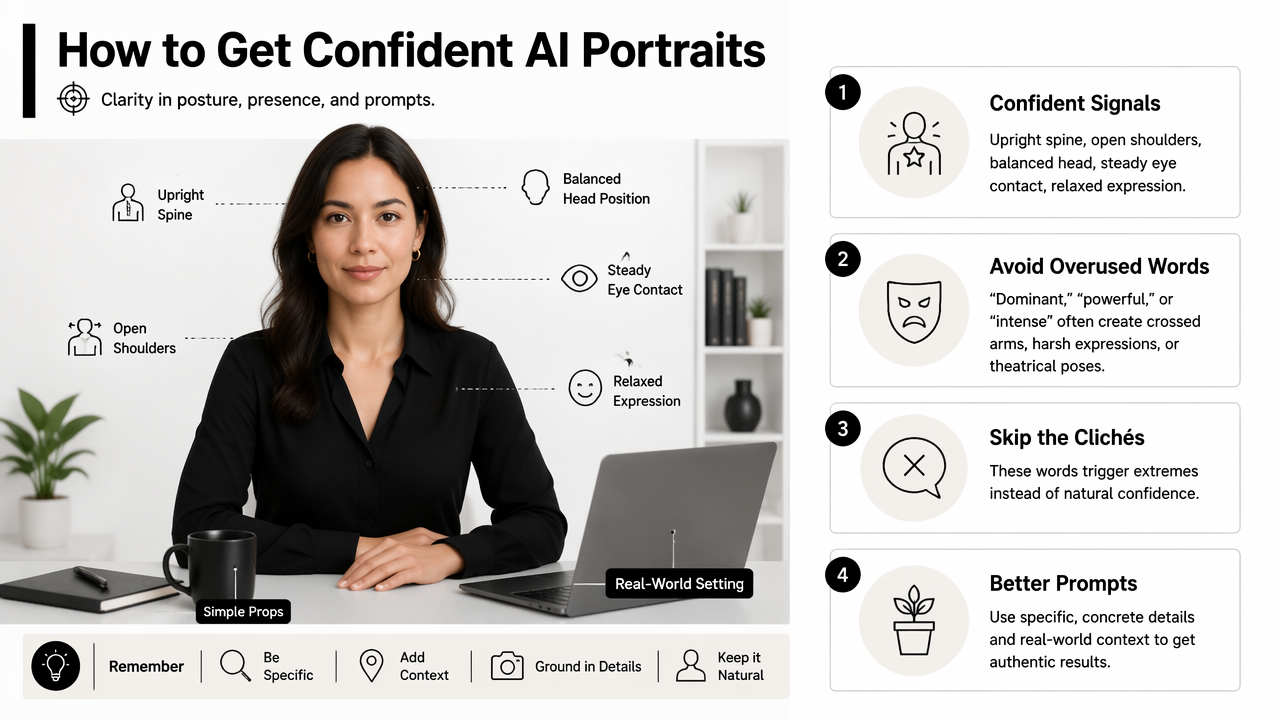
Models often overreact to words like "dominant," "powerful," or "intense." Those words can create crossed arms, harsh expressions, or theatrical poses. Better prompts use softer, observable language: "composed," "approachable," "relaxed confidence," and "open posture."
A prompt should guide both the body and the camera. A low camera angle can feel dramatic, while an eye-level camera feels more trustworthy for LinkedIn, resumes, and founder pages.
Posture prompt elements by visual effect
| Prompt element | Better wording | Visual effect | Best use case |
|---|---|---|---|
| Spine | "upright posture, natural spine alignment" | Alert without stiffness | LinkedIn headshots |
| Shoulders | "shoulders relaxed and slightly back" | Open, calm presence | Executives, founders |
| Head tilt | "subtle head tilt, chin level" | Friendly authority | Freelancers, coaches |
| Eye contact | "direct eye contact with soft eyes" | Trust and focus | Job seekers |
| Hands | "hands relaxed at sides or lightly clasped" | Natural body language | Full-body portraits |
| Lean | "slight forward lean from the torso" | Engagement and warmth | Creators, consultants |
Shoulder angle matters more than many prompts acknowledge. Squared shoulders can look direct, a three-quarter shoulder turn can look polished, and hunched shoulders often weaken the portrait.
The best head tilt is subtle. A strong tilt can read as playful or uncertain, while a level chin with a tiny angle can make the face look relaxed and human.
Negative prompt safeguards
Negative prompts help remove posture problems that commonly appear in generated portraits.
- Avoid: "stiff pose, hunched shoulders, tense jaw, exaggerated smile."
- Avoid: "crossed arms, aggressive stance, dramatic low angle."
- Avoid: "warped hands, twisted neck, asymmetrical shoulders."
- Avoid: "plastic skin, over-smoothed face, uncanny expression."
Authenticity also matters. A 2024 review by Kaur, Hoshyar, and Saikrishna examined deepfake video detection challenges and opportunities, which reflects broader public concern around synthetic media realism and trust source. For professional portraits, realistic detail usually performs better than flawless perfection.
Copy-paste prompts for executives, freelancers, creators, and job seekers
Role-specific prompts work better than one-size-fits-all prompts because confident posture looks different for a CEO, designer, creator, job applicant, and dating profile.
The Looktara platform can fit these prompt patterns into practical profile-image workflows, especially when a person needs several versions for hiring, social media, and personal branding. The goal is not to fake a personality; the goal is to translate real confidence into clear visual direction.
Best practice: one prompt should create one primary impression, such as "calm executive," "approachable expert," or "creative energy."
Professional and executive prompt templates
Executive headshot prompt:
"Create a realistic professional headshot of a senior business leader in a navy blazer, upright posture, shoulders relaxed and slightly back, chin level, direct eye contact, calm confident expression, slight natural smile, eye-level camera, soft studio lighting, neutral gray background, natural skin texture, 85mm portrait lens, chest-up crop."
Job seeker prompt:
"Create a realistic LinkedIn-style headshot of a job candidate, open posture, relaxed shoulders, subtle forward lean, friendly direct eye contact, composed smile, clean shirt and blazer, soft window light, uncluttered office background, eye-level camera, natural facial detail, professional but approachable."
Freelancer prompt:
"Create a natural personal-brand portrait of an independent consultant, three-quarter body angle, shoulders open, head slightly tilted, relaxed hands lightly clasped, warm confident expression, direct eye contact, modern workspace background, soft daylight, realistic texture, polished but not corporate."
Creator and social profile prompt templates
Creator prompt:
"Create a realistic portrait of a content creator standing in a bright studio, relaxed upright posture, one shoulder slightly angled toward the camera, open chest, natural smile, direct eye contact, casual stylish outfit, soft colorful background, energetic but calm expression, natural hands, realistic skin and hair."
Dating profile prompt:
"Create an authentic outdoor portrait of a friendly adult, relaxed posture, shoulders down, slight head tilt, genuine smile, soft eye contact, casual outfit, golden-hour lighting, natural background, no heavy retouching, candid but flattering composition."
For short-form video branding, confident posture should also match the thumbnail or cover design. A creator building visual consistency can pair portrait prompts with TikTok cover image generation so body language, colors, and topic labels feel connected.
How should prompts change by platform in 2026?
In 2026, confident posture prompts should change by platform because LinkedIn, creator profiles, ads, and personal apps reward different levels of polish, warmth, and visual energy.
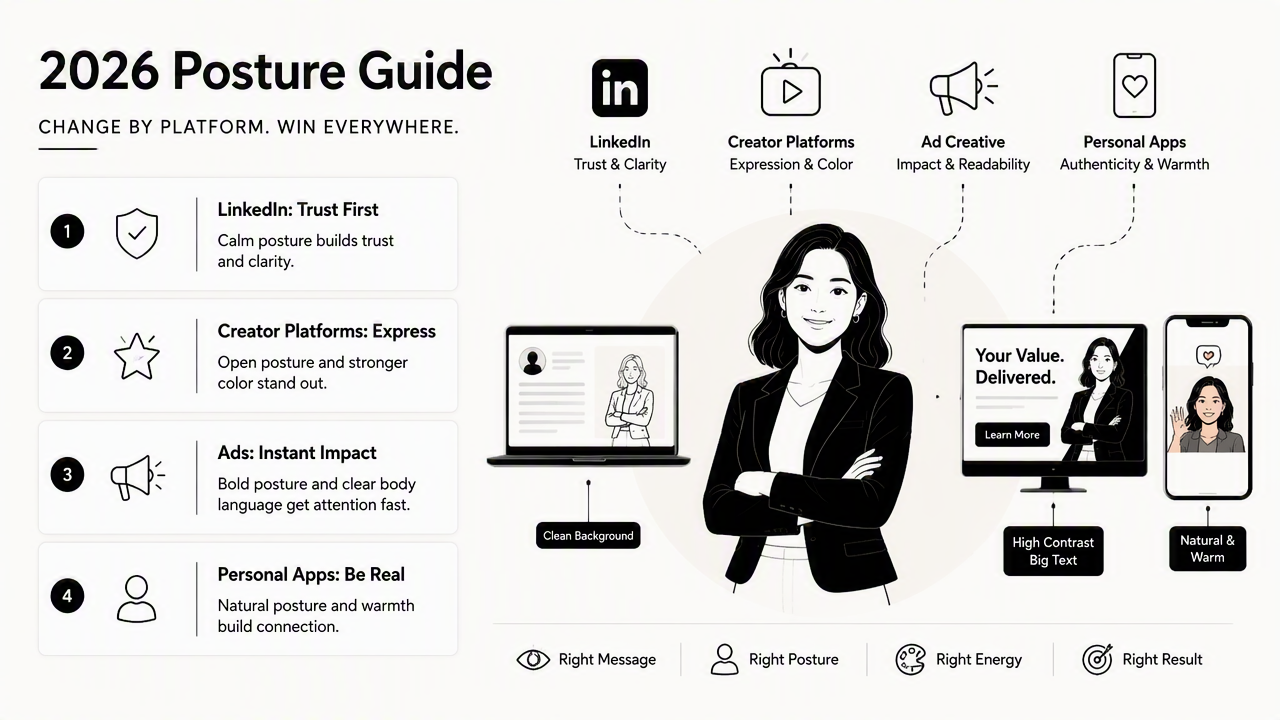
LinkedIn favors trust and clarity. Creator platforms favor expressive posture and stronger color. Ad creative needs instantly readable body language. Dating profiles need realism and ease, not corporate confidence.
The 2023 ACM paper by Jiang, Brown, and Cheng examined AI art's impact on artists, a reminder that synthetic visuals sit inside a broader creative and ethical conversation source. Profile images should still represent a believable version of the person, especially where hiring, business trust, or personal connection is involved.
Platform-by-platform posture guidance
| Platform | Posture direction | Expression | Prompt note |
|---|---|---|---|
| Upright, open shoulders, eye-level camera | Calm smile | Avoid fashion-editorial drama | |
| Resume | Straight posture, neutral background | Composed | Keep clothing simple |
| Founder page | Slight forward lean, three-quarter angle | Warm authority | Add brand-relevant setting |
| TikTok cover | Angled shoulders, visible gesture | Energetic | Leave space for text |
| Facebook ad | Open posture, clear face | Friendly confidence | Use bright lighting |
| Dating app | Relaxed stance, candid crop | Genuine smile | Avoid studio stiffness |
For professional publishing, AI-generated headshots can be paired with LinkedIn post image layouts to keep posture and brand tone consistent across profile photos and feed visuals.
For campaign images, posture cues should support the offer. A trainer, coach, or founder using Facebook ad creative may need a more open stance and stronger eye contact than a quiet resume portrait.
Prompt refinement checklist
A simple revision loop improves most AI portraits without changing the whole prompt.
- Check the shoulders: Are they open, even, and relaxed?
- Check the head: Is the chin level rather than raised or tucked?
- Check the eyes: Does eye contact feel direct without looking frozen?
- Check the mouth: Does the smile look natural, not pasted on?
- Check the hands: Are fingers visible only when the model handles them well?
- Check the crop: Does the frame match the platform?
A polished posture prompt should still leave room for personality. Over-controlling every muscle can make a portrait feel stiff, so the best prompts balance direction with natural language.
FAQ: confident posture prompts
Confident posture prompts work best when they describe visible body language in plain terms and keep the final image realistic.
These answers cover the most common prompt decisions for professional profiles, creator images, and social portraits.
What words make an AI headshot look more confident?
Use concrete words such as "upright posture," "relaxed shoulders," "open chest," "chin level," "direct eye contact," "soft smile," and "slight forward lean." Avoid relying only on abstract words like "successful" or "powerful," because image models may translate them into stiff, overly dramatic poses.
How can a prompt make posture look confident but not arrogant?
A prompt should combine strength with warmth. "Relaxed shoulders," "soft eyes," "slight smile," and "eye-level camera" usually feel more approachable than "dominant stance" or "intense gaze." A three-quarter shoulder angle can also soften the image while keeping the subject polished and self-assured.
Should AI portrait prompts mention head tilt?
Yes, but the head tilt should be subtle. "Slight head tilt with chin level" can make a portrait feel friendly and natural. Strong tilts may signal uncertainty, flirtation, or casual energy, which may not fit a resume, executive bio, or LinkedIn profile.
What negative prompts help fix awkward posture?
Useful negative prompts include "hunched shoulders," "stiff pose," "tense jaw," "twisted neck," "crossed arms," "warped hands," "exaggerated smile," and "uncanny expression." These terms help reduce common generated-image issues, especially when the portrait includes hands, angled shoulders, or a wider crop.
Conclusion
The best AI photo generator prompts for confident posture give the model physical direction: open shoulders, level chin, relaxed face, natural hands, direct eye contact, and a platform-specific crop. Start with one role-based template, generate several variations, then revise only the weakest body-language detail first.
For a practical next step, create one professional version, one social version, and one creator or campaign version. Looktara can help turn those prompt choices into usable profile and brand imagery, and more options are available at looktara.com. For offline or local promotion, the same posture choices can carry into flyer-style brand visuals.
Generated by EarlySEO.com