
TL;DR
AI-generated headshots can suit expert witness directories when they preserve current appearance, use neutral styling, and meet the publisher's rules. A conventional photograph remains the better choice when synthetic images aren't accepted. Confirm requirements, review likeness, and approve the final crop before publication.
An expert witness headshot should make recognition easy, not make qualifications look grander. An AI photo generator for expert witness profiles can help create a polished portrait, but the right standard is faithful professional presentation rather than dramatic visual appeal.
Expert witness: A person whose specialized education, training, certification, skills, or experience provides a basis for offering expert opinion.
AI-generated headshot: A portrait created or substantially reconstructed by an AI system, rather than simply captured by a camera.
For specialists considering Looktara, the useful starting point is a clear brief: recognizable appearance, understated clothing, and a background suited to a professional biography. In 2026, that brief should also include the intended directory's image policy.
Table of Contents
What makes an AI headshot suitable for an expert witness?
An AI headshot is suitable for an expert witness when it preserves the person's current likeness, presents a neutral professional appearance, and complies with the receiving directory's rules. The image should support identification alongside a factual biography, without suggesting qualifications, affiliations, or experience that the expert doesn't actually hold.
A directory portrait is a presentation asset, not proof of expertise. Education, publications, relevant practice, and other documented qualifications belong in the biography. The photograph's job is simpler: show the person clearly and consistently.
A restrained portrait usually serves that purpose better than a staged courtroom scene. Plain backgrounds keep attention on the face and work across directory listings, firm websites, and speaker biographies.
Compare image methods by the publishing requirement
The best image method depends on the publisher's requirements and the amount of change needed.
| Image method | Useful application | Main review requirement |
|---|---|---|
| New camera portrait | Listings requiring an actual photograph | Confirm lighting, crop, and current appearance |
| Lightly edited photograph | Updating exposure or removing background distractions | Keep facial features and identifying details intact |
| AI-generated headshot | Listings permitting synthetic portraits | Check likeness, styling, and the image policy |
| Existing recent portrait | Consistent profiles with minimal production work | Confirm image rights and sufficient resolution |
A professional portrait should communicate who the expert is, not create a visual argument for authority.
Which checks protect likeness and professional credibility?
A suitability review should cover four separate questions: faithful appearance, neutral presentation, directory compliance, and accurate credential signals. These checks address different risks, so a good facial resemblance alone isn't enough.
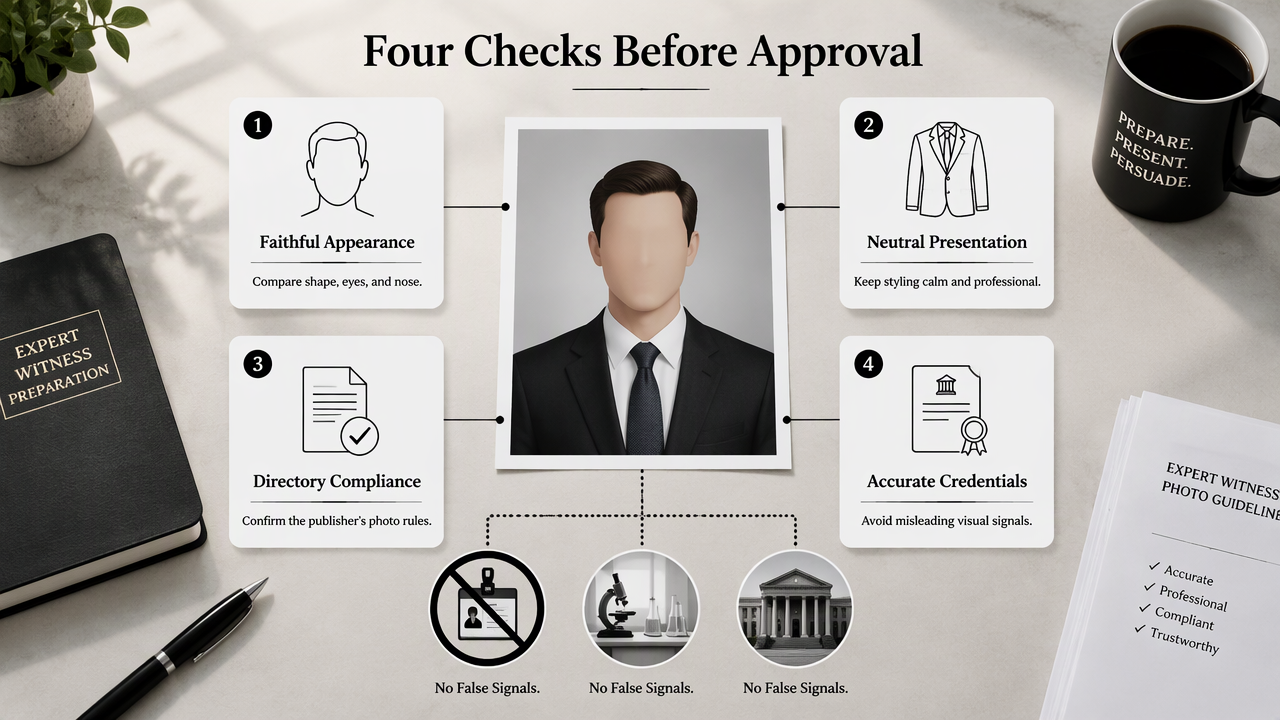
An image may resemble the expert while still introducing a badge, laboratory setting, or institutional logo that changes its meaning. Equally, a conservative portrait may fail a directory's technical requirements.
Apply the expert-profile suitability checklist
The approval checklist should cover both the face and the surrounding visual context.
- Faithful appearance: Compare facial shape, eyes, nose, hairline, skin tone, age appearance, and distinctive features against recent photographs.
- Neutral presentation: Choose ordinary professional clothing, a natural expression, and a plain or unobtrusive background.
- Directory rules: Confirm permitted image methods, dimensions, file format, crop, and any disclosure requirement.
- Credential accuracy: Exclude unearned insignia, invented certificates, inaccurate uniforms, and unsupported institutional branding.
- Expert approval: Have the depicted person inspect and approve the final image, including its thumbnail version.
A clinician's actual role may justify particular clothing, but a white coat shouldn't be added simply because it looks authoritative. Similar care applies to military decorations, judicial surroundings, and branded equipment.
Treat research as context, not a likeness guarantee
The 2021 paper On the Opportunities and Risks of Foundation Models by Rishi Bommasani and colleagues examines the broader opportunities and risks of foundation models. It isn't a validation study for expert-directory portraits or any particular headshot service.
Likewise, Kaiyang Zhou and colleagues' 2022 survey Domain Generalization addresses domain generalization in machine learning. Its topic provides technical context, not evidence that a generated face will remain accurate across clothing, poses, and lighting.
Approval should rest on the actual portrait and the publisher's policy, not a broad claim about AI quality.
How should an expert prepare and approve a portrait?
- Prepare an expert witness portrait by identifying the destination and obtaining its image requirements.
- Select recent, clear reference photographs reflecting current appearance.
- Specify neutral clothing, lighting, expression, and background.
- Compare generated candidates against the references.
- Test the final crop and secure the expert's approval before uploading.
Write a brief that favors recognition
A useful production brief describes the intended presentation without asking the model to invent status. For example: A current professional headshot of the depicted person, natural expression, plain gray background, ordinary business clothing, realistic skin texture, and head-and-shoulders framing.
Keep the brief separate from the expert's substantive qualifications. Prompts such as "leading courtroom authority" don't establish credentials and may encourage theatrical styling instead of a usable directory image.
Reference photographs should show a consistent, recent appearance. When glasses, facial hair, or hairstyle have changed, older images may give conflicting guidance.
Separate model setup from final-image review
Training or personalization configures how a system represents a person; inference produces an output from the configured system and a request. Providers may use these terms differently, so selection should focus on their documented workflow rather than labels alone.
A satisfactory setup doesn't automatically approve every output. Each candidate still needs comparison with the reference photographs, especially after changes to pose or lighting.
- Inspect facial details at full size.
- Check recognition in a small directory thumbnail.
- Verify clothing edges, glasses, ears, and background details.
- Save the approved file separately from unused candidates.
A simple record of the approval date and intended destinations makes later updates easier.
Where Looktara fits in expert-profile planning
Looktara belongs in the image-production stage of profile planning, with the expert's approved brief guiding the desired result. A focused brief connects the portrait to its real destination: an expert directory, consultancy biography, or professional networking profile.
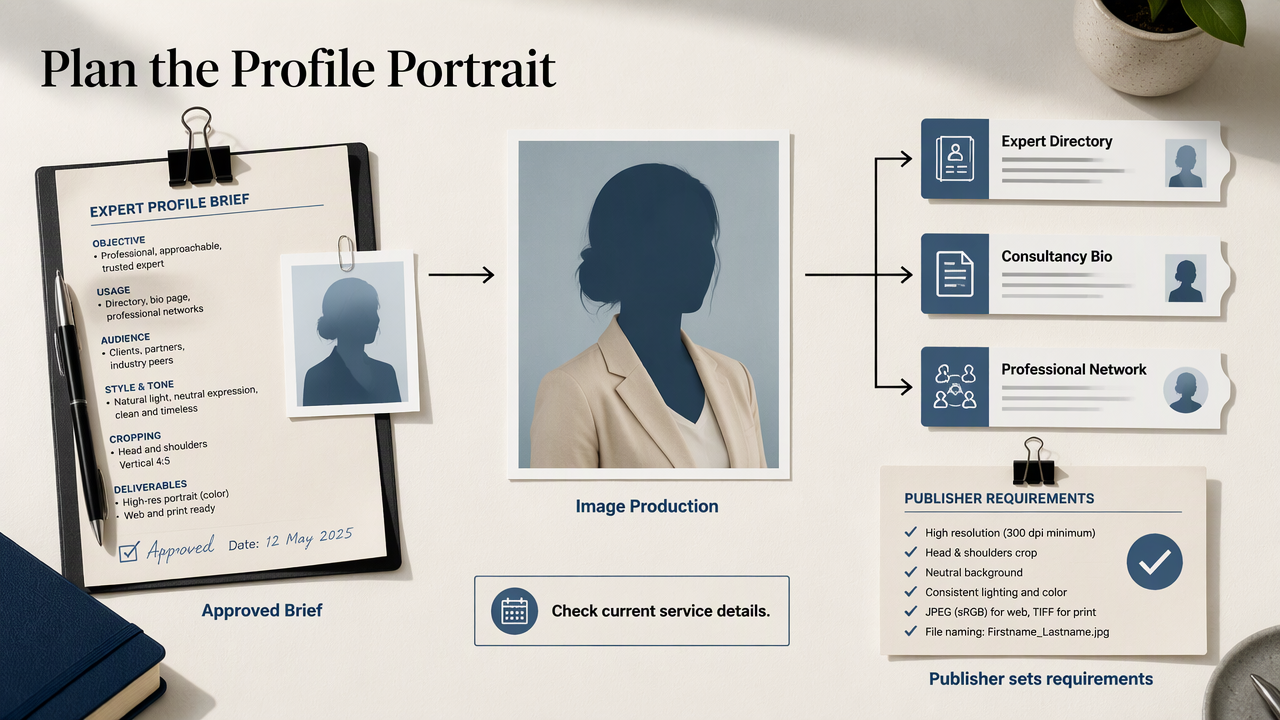
The useful commercial question is whether the available workflow supports that brief. Current service details on looktara.com can inform selection, while the receiving publisher supplies the requirements for the finished asset.
Match the portrait to the professional channel
Consistent framing and styling can help connect an expert's directory entry with other professional pages. For a fitness or exercise specialist whose profile work also includes LinkedIn, the fitness LinkedIn profile-picture generator page is a directly relevant category to explore.
For other disciplines, the brief should reflect the individual's actual role rather than borrowing fitness-oriented imagery. A forensic accountant, engineer, and medical specialist can all use neutral headshots without adopting the same wardrobe.
Build a reusable publication package
A publication package should contain approved versions suited to the destinations already identified.
- A high-resolution master image.
- A square crop for profile cards.
- A portrait crop for longer biographies.
- A short record of approval and image-production method.
The Looktara platform can be considered within this planned production process. Preparing the destination requirements first gives the selection a concrete purpose and keeps the final review manageable.
Expert witness AI headshot FAQ
These answers distinguish profile presentation from evidence handling and publication policy.
Directory acceptance, personal approval, and legal evidentiary use are separate decisions.
Does a directory headshot qualify as legal evidence?
A directory headshot serves a different purpose from evidence offered in a legal proceeding. Approval for a biography doesn't establish authenticity or suitability for evidentiary use. If an image becomes relevant to a dispute, its production method and handling should be assessed separately under the applicable legal requirements.
Must an AI-generated portrait be disclosed?
Disclosure requirements depend on the publisher's policy and any applicable rules. The practical approach is to ask the directory before submission, especially when its instructions request a photograph without defining acceptable editing. Where disclosure is required, a clear description of the production method is preferable to an ambiguous label.
Can the same portrait appear on a CV and directory?
The same approved portrait can be considered for both destinations when their policies, image rights, and technical specifications allow it. A CV may need a different crop from a directory card. Each destination should receive the appropriate file rather than relying on automatic cropping that could cut off important facial detail.
What privacy questions matter before uploading reference photos?
Relevant questions include how uploaded photographs are stored, who can access them, whether they are used for model training, and how deletion works. Experts should review the provider's current terms before uploading. Reference images should show only the consenting subject and avoid confidential documents, patient information, or unrelated people.
Conclusion
A suitable AI photo generator for expert witness profiles supports a recognizable, neutral portrait that meets the intended publisher's requirements. The next step is concrete: obtain the directory's rules, prepare a current reference set, and approve one finished image at full size and thumbnail size. For portrait planning, visit looktara.com with that brief ready.
Generated by EarlySEO.com